


Update: Tome 1.12: Cactus wren

What’s included in this update?
The Tome 1.12 Cactus wren update introduces a streamlined tag-based creation process, the ability to change the parent of narrative pages, and several additional features.
It also includes fixes for a number of issues reported by the community.
Create an element from tag search
You can now create a narrative page, memo, or map directly from a tag.
For example, while writing a scene, you may want to add a character.
Simply type an @ tag with the character’s name, and a shortcut will appear, allowing you to instantly create that character’s memo.
Note: at this time, it is not possible to create Lore pages from Tome.

Change the parent of narrative pages
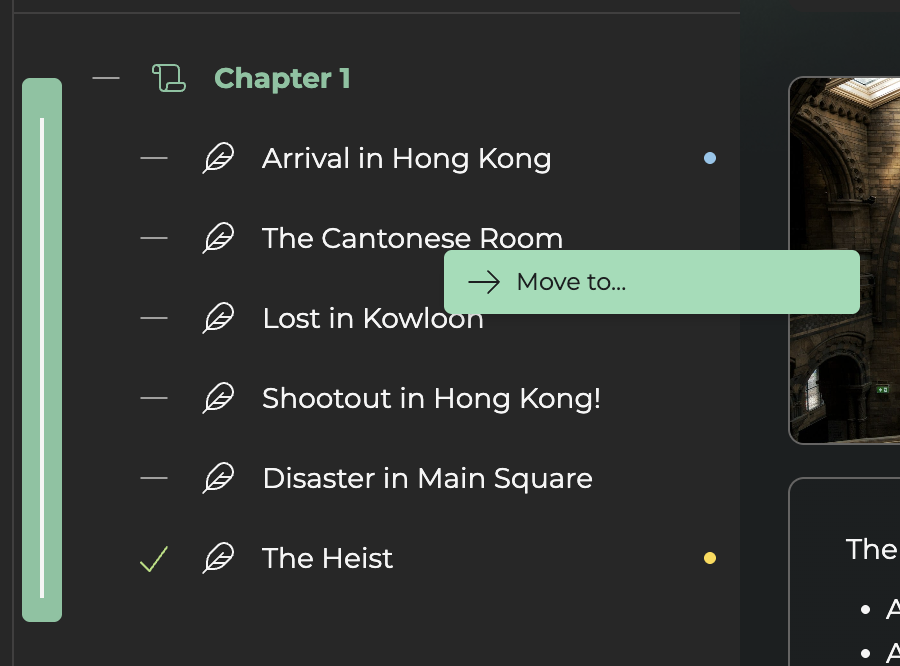
You can now change the parent of your narrative pages. To do this, simply right-click or click the three dots next to the page title and select the option to change its parent.
This feature allows you, for example, to move a scene into a different chapter.
Sort dividers
In the Directory, you can now sort memos within a divider in ascending or descending alphabetical order.
You can also drag and drop an entire divider along with its content. Please note that the divider must be collapsed for this to work.

Create a “draft” tag
Want to create an element from a tag but unsure which attributes to assign? You can now create a draft tag.
This feature allows you to keep your element as a draft before turning it into a proper tag, so you can continue writing without interruption.

Improvements in Tome
We have also fixed several reported bugs and made a few minor improvements. For example, tag search now closes more easily than before.